Compare
Keep up to five real product or finish options inside one Decision Set instead of spreading the shortlist across tabs, messages and spreadsheet rows.

RenoKeep Selection Book · v1.1
Make every product selection clear before you order.
For homeowners coordinating their own renovation: compare the shortlist, mark the current final, preserve later revisions and keep the information needed for ordering and handoff in one local project.
How to install · Open buyer access
One-time purchase · Local browser application · No RenoKeep account · No cloud sync required
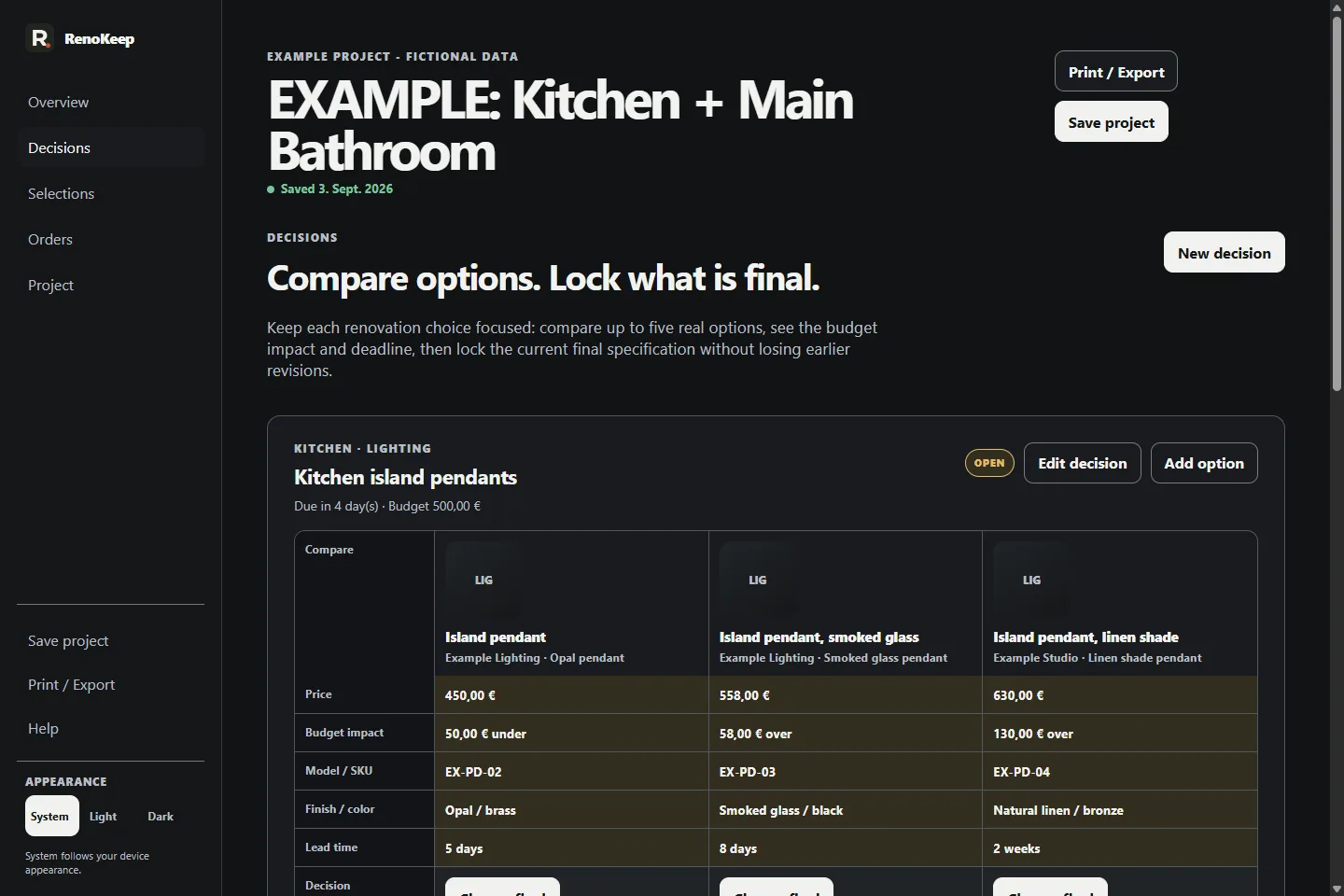
Real product. Real screens.
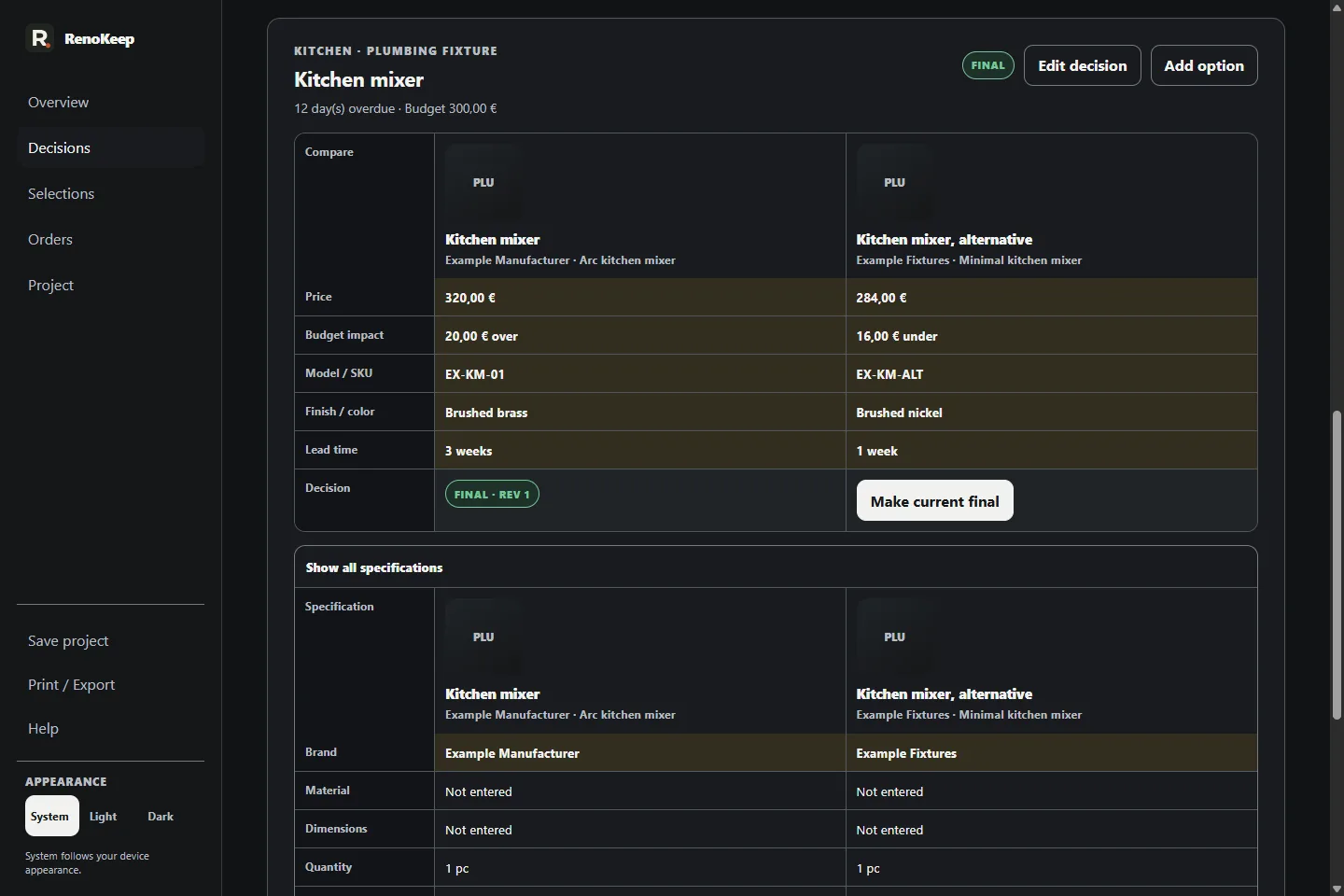
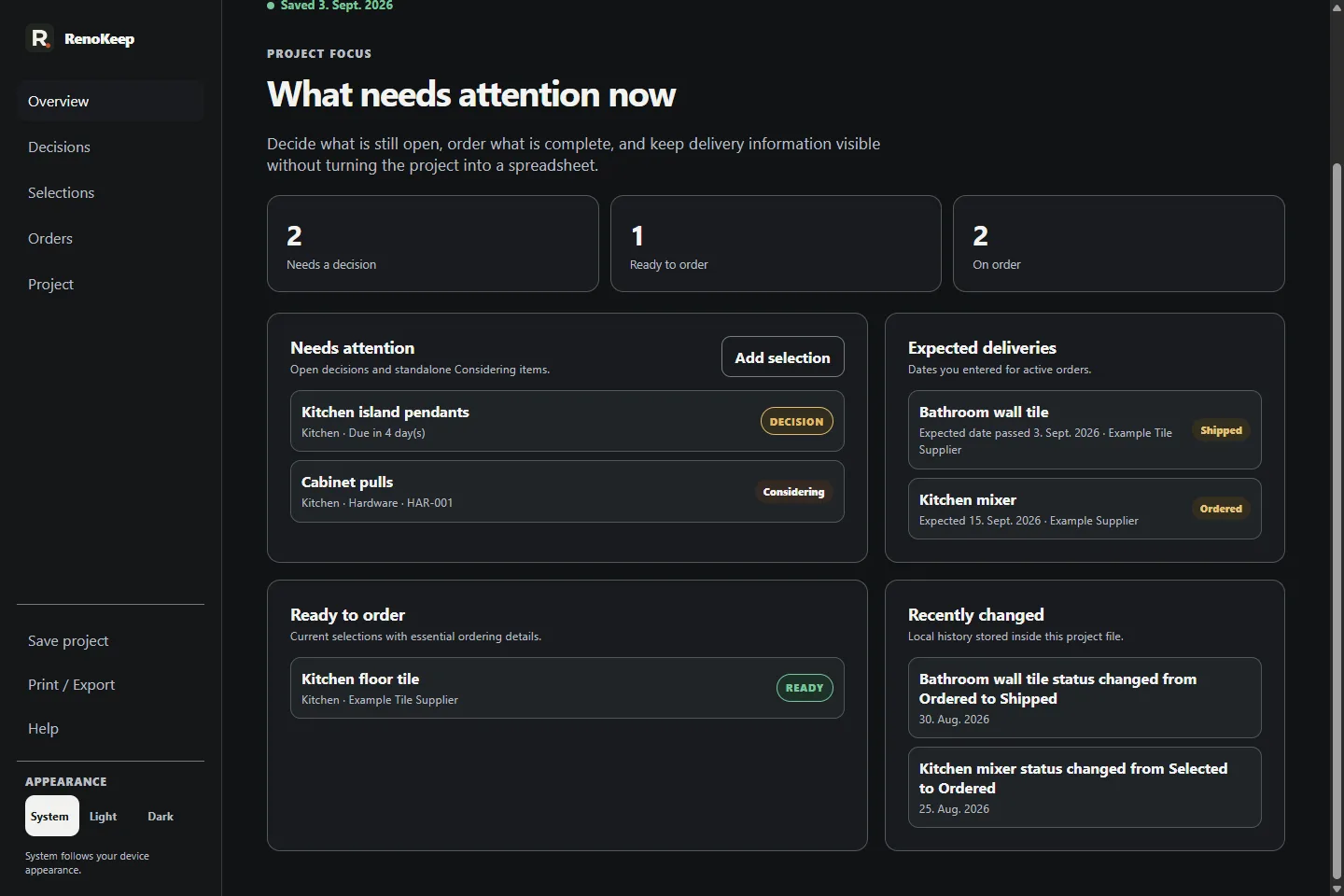
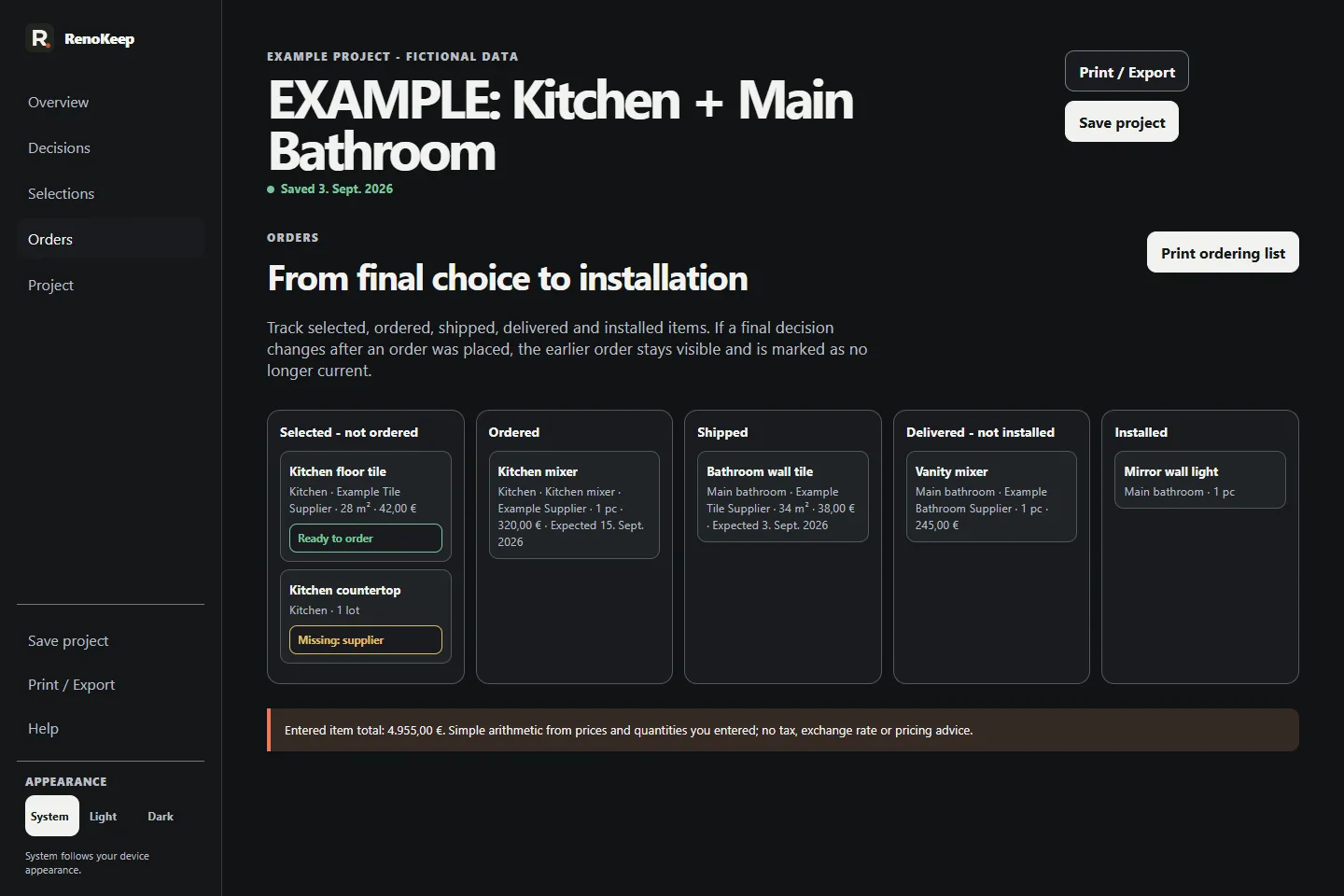
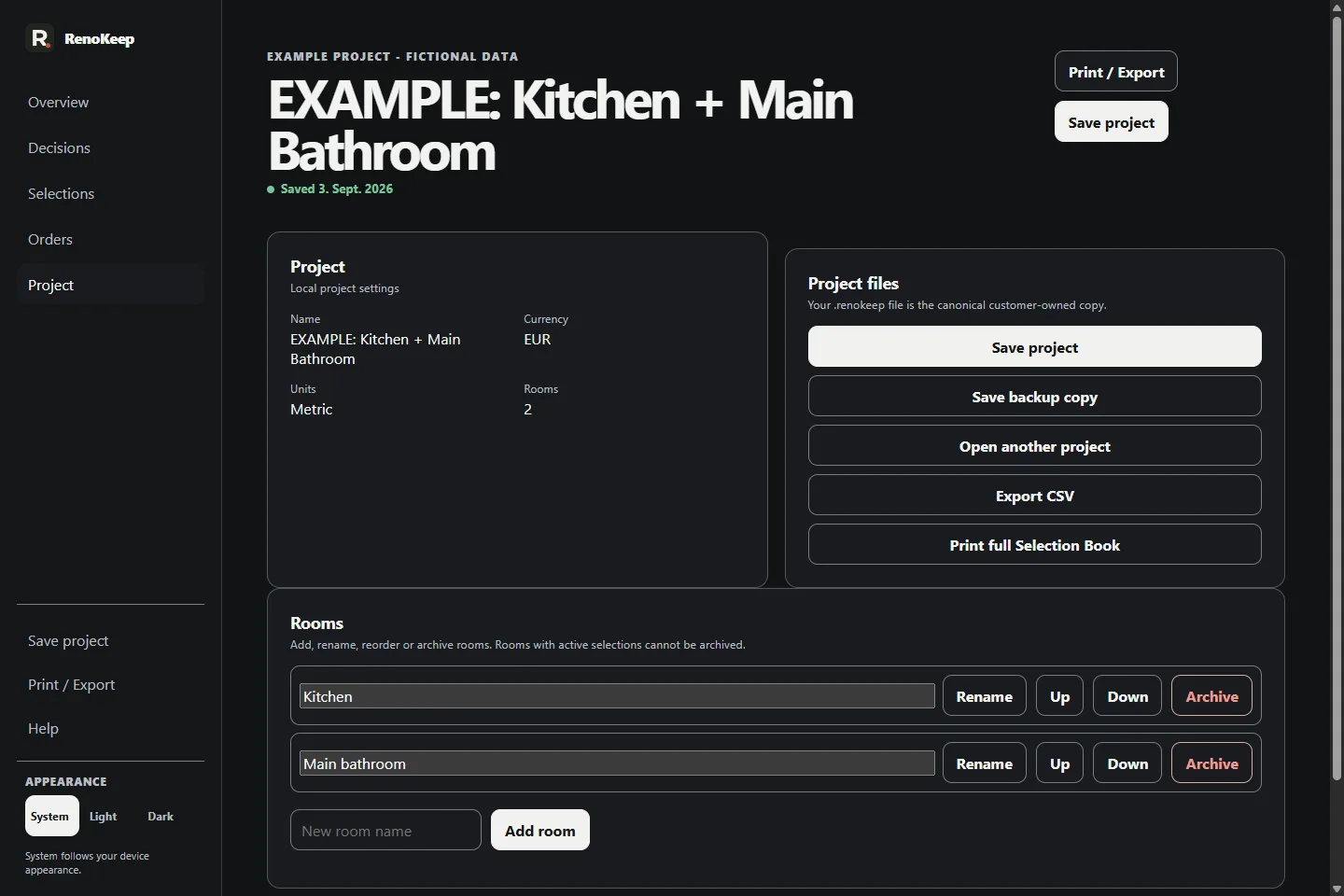
Real output samples
These files were generated from the approved Selection Book v1.1 application using its included, clearly fictional Kitchen + Main Bathroom example project. No customer data is used.
Free starter
Use the free RenoKeep Renovation Selection Spreadsheet to track the current snapshot of fixtures, finishes, suppliers, allowances and order status. No email required.
What you receive
Buyer access includes the local-first HTTPS PWA. The existing desktop ZIP remains a separate, unchanged download.
RenoKeep-Selection-Book.htmlRenoKeep-Quick-Start.pdfRenoKeep-Example-Project.renokeepLICENSE.txtmanifest.jsonUse your purchase email to recover access to the purchased version. Open the latest one-use email link and choose Confirm buyer access. After website-data loss or device change, repeat email recovery. Recovery restores buyer access, not missing project files.
Confirm buyer access and finish offline setup online. After the app confirms offline readiness, it can reopen offline on this device. Changes save locally in this browser; export independent .renokeep backups for recovery and device changes. Browser storage can be cleared or lost. Signing out prevents new online access but cannot immediately revoke software already cached offline.
Local by design
The PWA saves changes locally on this browser. Buyer access uses a secure session cookie; offline setup and updates fetch static application resources. Project contents are not uploaded or synced. Keep independent .renokeep backups. The desktop ZIP remains offline.
.renokeep project fileSave, reopen and back up the working project yourself.
CSV + print/PDFMove project records into the handoff format you need.
No cloud recoveryThere is no RenoKeep cloud copy; keep your own backups.
Choose your platform
Browser use, app installation and offline readiness are separate steps.
Use Selection Book in a browser or install it for a separate app window or home-screen icon. These are the recommended platform and browser combinations for the PWA; use current versions.
| Platform | Browser | Installation |
|---|---|---|
| Windows | Google Chrome, Microsoft Edge | Install from the browser menu; reopen from Start or the app launcher. |
| macOS | Google Chrome, Microsoft Edge, Safari | Install from Chrome or Edge. In Safari on macOS Sonoma 14 or later, use Add to Dock. |
| iPhone and iPad | Safari | Share → Add to Home Screen. Enable Open as Web App when offered. |
| Android | Google Chrome | Use Install or Add to Home screen from Chrome's menu; wording varies by version. |
Buyer confirmation and initial offline setup need internet. Check offline readiness in the browser or installed app you will use: wait for Ready offline. After setup, local project work can continue offline. Updates and buyer-access recovery need internet.
Browser use requires working local storage and offline web features. Installation is a separate browser capability. Current Firefox on Windows offers web-app windows; its installation options differ on other platforms. Samsung Internet on Android also supports web-app installation, with its own menus. The step-by-step instructions here use the browsers in the table. A shortcut alone does not confirm offline readiness.
Use a regular browser window with website storage allowed. Private browsing, embedded email/social browsers and managed-device restrictions can limit storage or installation.
Desktop ZIP: The desktop ZIP is a separate local-file edition for Google Chrome and Microsoft Edge on Windows. PWA installation instructions do not extend the ZIP's compatibility.
Personal use
For your own household renovation projects. Completed project outputs may be shared with contractors, designers, installers, suppliers and other people helping with that project. The blank application and bundle are not licensed for another person's independent use, subject to mandatory rights.
Focused by design
Before you buy
No. Selection Book is designed as a one-time digital-product purchase. A price is shown only when the exact release is actually available to buy.
You may share completed project outputs for your licensed household renovation with contractors, designers, installers, suppliers and other project participants. The blank application and bundle are not licensed for another person's independent use, subject to mandatory rights.
The current final can be revised. Selection Book preserves the earlier final as a revision snapshot so the change is visible instead of silently replacing the earlier decision.
No. Order Ready checks whether the information recorded in the project is complete enough for the defined handoff rule. Selection Book does not place orders or verify live supplier prices.
No. Selection Book can show an allowance and budget delta for a decision, but it is not full accounting, contractor management, invoicing or a Gantt scheduling platform.
RenoKeep handles product-use, delivery and privacy questions. Paddle handles transaction-side order lookup, receipts, payment, tax and refund requests after an enabled purchase.
No RenoKeep account is required. Confirm access using your purchase email. Buyer confirmation and initial offline setup need internet. Check offline readiness in the browser or installed app you will use: wait for Ready offline. After setup, local project work can continue offline. Updates and buyer-access recovery need internet.
Changes save automatically in this browser on this device. Export independent .renokeep backups; RenoKeep does not upload, sync or keep a cloud copy of your projects. Browser profiles, installed apps and devices can have separate storage. The desktop ZIP keeps its file-based workflow.
If the project is still available in the app, export a new backup. If local app data and all independent backups are lost, RenoKeep has no cloud project copy to restore. Email recovery restores buyer access, not project contents.
Windows: Google Chrome or Microsoft Edge. Mac: Google Chrome, Microsoft Edge or Safari. iPhone and iPad: Safari. Android: Google Chrome. Use current browser versions. The desktop ZIP is a separate local-file edition for Google Chrome and Microsoft Edge on Windows. PWA installation instructions do not extend the ZIP's compatibility.
Open the PWA through buyer access first, then use the installation option offered by your browser. Installation adds an app shortcut or window; it does not by itself finish offline setup. Follow How to install for your platform.
Export a .renokeep backup on the original device, transfer the file yourself, confirm buyer access on the other device and import the backup using Open project. There is no automatic cloud synchronization.
How to install · Access, offline setup and backups
One focused tool. One-time purchase.
Compare renovation choices, preserve revisions and prepare order-ready handoffs without creating another subscription or cloud workspace.
RenoKeep handles product-use, delivery and privacy questions. Paddle handles transaction-side order lookup, receipts, payment, tax and refund requests after an enabled purchase.
Open RenoKeep support · Read the refund information · Withdraw from contract
Operator and support
RenoKeep is operated by Slava Maajoul, a sole proprietor based in Münster, Germany. Product and delivery support is available at support@renokeep.com or +49 176 24132171.
OperatorSlava Maajoul
Business formsole proprietorship
LocationMünster, Germany